Tuesday, 31 December 2013

How to find Linux Disk utilization

iostat syntax for disk utilization report

iostat -d -x interval count
  • -d : Display the device utilization report (d == disk)
  • -x : Display extended statistics including disk utilization
  • interval : It is time period in seconds between two samples . iostat 2 will give data at each 2 seconds interval.
  • count : It is the number of times the data is needed . iostat 2 5 will give data at 2 seconds interval 5 times

Display 3 reports of extended statistics at 5 second intervals for disk

Type the following command:
$ iostat -d -x 5 3
Output:
Linux 2.6.18-53.1.4.el5 (moon.nixcraft.in)   12/17/2007
Device:         rrqm/s   wrqm/s   r/s   w/s   rsec/s   wsec/s avgrq-sz avgqu-sz   await  svctm  %util
sda               1.10    39.82  3.41 13.59   309.50   427.48    43.36     0.17   10.03   1.03   1.75
sdb               0.20    18.32  1.15  6.08   117.36   195.25    43.22     0.51   71.14   1.26   0.91
Device:         rrqm/s   wrqm/s   r/s   w/s   rsec/s   wsec/s avgrq-sz avgqu-sz   await  svctm  %util
sda               0.00   108.40  1.40 64.40    49.60  1382.40    21.76     0.04    0.67   0.44   2.92
sdb               0.00    37.80  0.00 245.20     0.00  2254.40     9.19    28.91  108.49   1.08  26.36
Device:         rrqm/s   wrqm/s   r/s   w/s   rsec/s   wsec/s avgrq-sz avgqu-sz   await  svctm  %util
sda               0.00    97.01  1.00 57.29    39.92  1234.33    21.86     0.03    0.58   0.50   2.89
sdb               0.00    38.32  0.00 288.42     0.00  2623.55     9.10    32.97  122.30   1.15  33.27
Where,
  • rrqm/s : The number of read requests merged per second that were queued to the hard disk
  • wrqm/s : The number of write requests merged per second that were queued to the hard disk
  • r/s : The number of read requests per second
  • w/s : The number of write requests per second
  • rsec/s : The number of sectors read from the hard disk per second
  • wsec/s : The number of sectors written to the hard disk per second
  • avgrq-sz : The average size (in sectors) of the requests that were issued to the device.
  • avgqu-sz : The average queue length of the requests that were issued to the device
  • await : The average time (in milliseconds) for I/O requests issued to the device to be served. This includes the time spent by the requests in queue and the time spent servicing them.
  • svctm : The average service time (in milliseconds) for I/O requests that were issued to the device
  • %util : Percentage of CPU time during which I/O requests were issued to the device (bandwidth utilization for the device). Device saturation occurs when this value is close to 100%.

How do I interpret the output result for optimization?

First you need to note down following values from the iostat output:
  1. The average service time (svctm)
  2. Percentage of CPU time during which I/O requests were issued (%util)
  3. See if a hard disk reports consistently high reads/writes (r/s and w/s)
If any one of these are high, you need to take one of the following action:
  • Get high speed disk and controller for file system (for example move from SATA I to SAS 15k disk)
  • Tune software or application or kernel or file system for better disk utilization
  • Use RAID array to spread the file system
For example, from about iostat report it appears that /dev/sdb under load. Hope this information will help you diagnose and optimize disk related issues.

Linux System Memory Utilization

free command examples

Type the free command at shell prompt to display amount of free and used memory in the system in human readable format from /proc/meminfo:
$ free
$ free -m

Output:
             total       used       free     shared    buffers     cached
Mem:          2010       1965         45          0        152        776
-/+ buffers/cache:       1036        974
Swap:         2047        137       1910
The -b,-k,-m,-g option show output in bytes, KB, MB, or GB. As I said eariler you use cat command to display contents of /proc/meminfo:
$ cat /proc/meminfo
$ less /proc/meminfo

Sample outputs:
MemTotal:       12195116 kB
MemFree:          157328 kB
Buffers:          375424 kB
Cached:          9298412 kB
SwapCached:        22616 kB
Active:          5714924 kB
Inactive:        5473744 kB
Active(anon):     870136 kB
Inactive(anon):   644700 kB
Active(file):    4844788 kB
Inactive(file):  4829044 kB
Unevictable:           0 kB
Mlocked:               0 kB
SwapTotal:       6291448 kB
SwapFree:        6168080 kB
Dirty:             35760 kB
Writeback:             0 kB
AnonPages:       1493084 kB
Mapped:           567616 kB
Shmem:                 4 kB
Slab:             667828 kB
SReclaimable:     566912 kB
SUnreclaim:       100916 kB
KernelStack:        3240 kB
PageTables:        54692 kB
NFS_Unstable:          0 kB
Bounce:                0 kB
WritebackTmp:          0 kB
CommitLimit:    12389004 kB
Committed_AS:    4022128 kB
VmallocTotal:   34359738367 kB
VmallocUsed:       52908 kB
VmallocChunk:   34359680588 kB
HardwareCorrupted:     0 kB
AnonHugePages:   1212416 kB
HugePages_Total:       0
HugePages_Free:        0
HugePages_Rsvd:        0
HugePages_Surp:        0
Hugepagesize:       2048 kB
DirectMap4k:        7488 kB
DirectMap2M:    12574720 kB

Update free command every [delay] seconds

To update every 5 seconds, enter:
# free -s 5
Pass the -c option to update [count] times i.e. update free command every 2 seconds 3 times, enter:
# free -s 2 -c 3
Sample outputs:
             total       used       free     shared    buffers     cached
Mem:      12195116   11992716     202400          0     374820    9255356
-/+ buffers/cache:    2362540    9832576
Swap:      6291448     123368    6168080
 
             total       used       free     shared    buffers     cached
Mem:      12195116   11992468     202648          0     374820    9255112
-/+ buffers/cache:    2362536    9832580
Swap:      6291448     123368    6168080
 
             total       used       free     shared    buffers     cached
Mem:      12195116   11993700     201416          0     374824    9255140
-/+ buffers/cache:    2363736    9831380
Swap:      6291448     123368    6168080

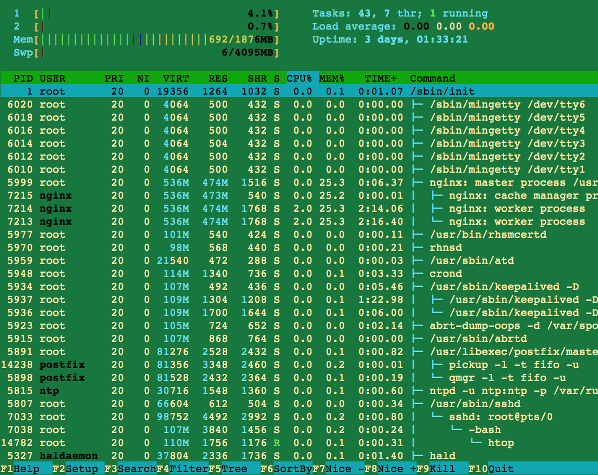
Sai hello to top / atop / htop commands

The top command display Linux tasks including memory used by process. atop command orhtop commands are top like tools with additional options:
# top
# atop
# htop
Sample outputs:
Fig.01 htop command in action

vmstat command examples

vmstat command provides more information :
$ vmstat
Output:
procs -----------memory---------- ---swap-- -----io---- --system-- -----cpu------
 r  b   swpd   free   buff  cache   si   so    bi    bo   in   cs us sy id wa st
 0  0 140480  43636 158196 797692    1    0   108   220    1    4  7  5 87  1  0

Understanding vmstat memory options

  • swpd: the amount of virtual memory used.
  • free: the amount of idle memory.
  • buff: the amount of memory used as buffers.
  • cache: the amount of memory used as cache.
  • inact: the amount of inactive memory (see -a option).
  • active: the amount of active memory (see -a option).
$ vmstat -a
Output:
procs -----------memory---------- ---swap-- -----io---- --system-- -----cpu------
 r  b   swpd   free  inact active   si   so    bi    bo   in   cs us sy id wa st
 0  1 140480  37376 109516 1730040    1    0   108   220    1    4  7  5 87  1  0
The following command displays one new line of utilization data every second
$ vmstat 1
The following command displays one new line per 2 second, but only for the next 10 seconds:
$ vmstat 2 10
Sample outputs:
procs -----------memory---------- ---swap-- -----io---- --system-- -----cpu------
 r  b   swpd   free  inact active   si   so    bi    bo   in   cs us sy id wa st
 4  0 139216  23508 130644 1723680    1    0   108   220    1    5  7  5 87  1  0
 2  0 139216  23252 130668 1723816    0    0     0   410 3242 11472  9  7 84  0  0
 1  0 139216  23120 130656 1724012    0    0     0   750 3280 11592  3  6 90  1  0
 0  0 139216  22996 130588 1724180    0    0     0   426 3272 11052  2  5 93  0  0
 2  0 139216  20988 129932 1726980    0    0     6  1146 3353 12105 14  9 74  2  0
 1  0 139216  20244 129900 1727216    0    0     0   392 3238 11752  8  7 85  0  0
 1  0 139216  20120 129868 1727352    0    0     0   444 3197 11173  2  5 93  0  0
 1  0 139216  25964 129852 1721044    0    0     0   268 3147 9269  1  4 95  0  0
 3  0 139216  25964 129748 1721196    0    0     2   132 3199 10540  1  4 95  0  0
 1  0 139216  25964 129676 1721332    0    0     0   456 3213 10608  2  4 93  1  0

Show memory statistics using vmstat

Pass the -s option to vmstat command displays a table of various event counters and memory statistics:
# vmstat -s
Sample outputs:
     12195116  total memory
     12020152  used memory
      5697412  active memory
      5475156  inactive memory
       174964  free memory
       375496  buffer memory
      9299280  swap cache
      6291448  total swap
       123368  used swap
      6168080  free swap
      9174417 non-nice user cpu ticks
         2353 nice user cpu ticks
      3338415 system cpu ticks
    831004606 idle cpu ticks
       327853 IO-wait cpu ticks
         9074 IRQ cpu ticks
      1075734 softirq cpu ticks
            0 stolen cpu ticks
      5001944 pages paged in
   1015656377 pages paged out
        28385 pages swapped in
        54024 pages swapped out
   2347308881 interrupts
   1694761409 CPU context switches
   1387092323 boot time
       246261 forks

Create trigger example


=======================================  DML STATEMENT TRIGGER  ======================================
SQL> create or replace Trigger secure_emp
  2  before insert on employees
  3  begin
  4  if (TO_CHAR(SYSDATE,'DY') IN ('SAT','SUN')) OR (TO_CHAR(SYSDATE,'HH24:MI')
  5  NOT BETWEEN '08:00' AND '18:00') THEN
  6  RAISE_APPLICATION_ERROR (-20500,'You may insert EMPLOYEES table only during business hours.');
  7  END IF;
  8  END;
  9  /

Trigger created.

SQL>


SQL> insert into employees (employee_id, last_name, first_name,email,hire_date,job_id,salary,department_id)
  2  values (300,'smith','rob','RSMITH',SYSDATE,'IT_PROG',4500,60);
insert into employees (employee_id, last_name, first_name,email,hire_date,job_id,salary,department_id)
            *
ERROR at line 1:
ORA-20500: You may insert EMPLOYEES table only during business hours.
ORA-06512: at "HR.SECURE_EMP", line 4
ORA-04088: error during execution of trigger 'HR.SECURE_EMP'


SQL>
======================================  USING CONDITION PRIDECATE ==================================


SQL> create or replace Trigger secure_emp
  2  before insert OR update OR delete on employees
  3  begin
  4  if (TO_CHAR(SYSDATE,'DY') IN ('SAT','SUN')) OR (TO_CHAR(SYSDATE,'HH24:MI')
  5  NOT BETWEEN '08:00' AND '18:00') THEN
  6    if DELETING THEN
  7  RAISE_APPLICATION_ERROR (-20502,'You may delete FROM  EMPLOYEES table only during business hours.');
  8  Elsif INSERTING THEN
  9  RAISE_APPLICATION_ERROR (-20500,'You may insert EMPLOYEES table only during business hours.');
 10  Elsif UPDATING THEN
 11  RAISE_APPLICATION_ERROR (-20503,'You may update salary only during business hours.');
 12  Else
 13  RAISE_APPLICATION_ERROR (-20504,'You may update EMPLOYEES table only during business hours.');
 14  end if;
 15  end IF;
 16  END;
 17  /

Trigger created.

SQL>


============================================  DML ROW TRIGGER =========================================================

SQL> create or replace trigger restrict_salary
  2  before insert or update of salary on employees
  3  for each row
  4  begin
  5  IF NOT (:NEW.JOB_ID IN ('AD_PRES','AD_VP')) AND :NEW.SALARY > 15000 THEN
  6  RAISE_APPLICATION_ERROR (-20202, 'EMPLOYEE CANNOT EARN THIS AMOUNT');
  7  END IF;
  8  END;
  9  /

Trigger created.


SQL> select salary,job_id from employees where job_id in ('AD_PRES','AD_VP');

    SALARY JOB_ID
---------- ----------
     24000 AD_PRES
     17000 AD_VP
     17000 AD_VP


SQL> UPDATE EMPLOYEES SET SALARY=25000 WHERE job_id ='AD_PRES';

1 row updated.

SQL> UPDATE EMPLOYEES SET SALARY=16000 WHERE LAST_NAME ='Kochhar';

1 row updated.

SQL> select salary,job_id,LAST_NAME from employees where job_id in ('AD_PRES','AD_VP');

    SALARY JOB_ID     LAST_NAME
---------- ---------- -------------------------
     25000 AD_PRES    King
     16000 AD_VP      Kochhar
     17000 AD_VP      De Haan


SQL> select salary,job_id from employees where job_id ='AD_ASST';

    SALARY JOB_ID
---------- ----------
      4400 AD_ASST

SQL> UPDATE EMPLOYEES SET SALARY=16000 WHERE job_id ='AD_ASST';
UPDATE EMPLOYEES SET SALARY=16000 WHERE job_id ='AD_ASST'
         *
ERROR at line 1:
ORA-20202: EMPLOYEE CANNOT EARN THIS AMOUNT
ORA-06512: at "HR.RESTRICT_SALARY", line 3
ORA-04088: error during execution of trigger 'HR.RESTRICT_SALARY'


SQL> UPDATE EMPLOYEES SET SALARY=6000 WHERE job_id ='AD_ASST';

1 row updated.

SQL> select salary,job_id from employees where job_id ='AD_ASST';

    SALARY JOB_ID
---------- ----------
      6000 AD_ASST

S=================================================================================================================


SQL> CREATE TABLE AUDIT_EMP_TABLE (user_name varchar2(15),timestamp date, id number(5),old_last_name varchar2(20),
  2  new_last_name varchar2(20),old_title varchar2(20),new_title varchar2(20),old_salary number(6),new_salary number(6));

Table created.

SQL> select * from tab;

TNAME                          TABTYPE  CLUSTERID
------------------------------ ------- ----------
REGIONS                        TABLE
COUNTRIES                      TABLE
LOCATIONS                      TABLE
DEPARTMENTS                    TABLE
JOBS                           TABLE
EMPLOYEES                      TABLE
JOB_HISTORY                    TABLE
EMP_DETAILS_VIEW               VIEW
BIN$acl1i5wGQUaiEKnRLWwbrw==$0 TABLE
AUDIT_EMP_TABLE                TABLE

10 rows selected.

SQL> select * from audit_emp_table;

no rows selected

SQL> desc  audit_emp_table;
 Name                                      Null?    Type
 ----------------------------------------- -------- ----------------------------
 USER_NAME                                          VARCHAR2(15)
 TIMESTAMP                                          DATE
 ID                                                 NUMBER(5)
 OLD_LAST_NAME                                      VARCHAR2(20)
 NEW_LAST_NAME                                      VARCHAR2(20)
 OLD_TITLE                                          VARCHAR2(20)
 NEW_TITLE                                          VARCHAR2(20)
 OLD_SALARY                                         NUMBER(6)
 NEW_SALARY                                         NUMBER(6)


SQL> create or replace trigger audit_emp_values
  2  after insert or update or delete on employees
  3  for each row
  4  begin
  5  insert into audit_emp_table (user_name,timestamp,id,old_last_name,new_last_name,old_title,new_title,old_salary,
  6  new_salary)
  7  values (user,sysdate,:old.employee_id,:old.last_name,:new.last_name,:old.job_id,:new.job_id,:old.salary,:new.salary);
  8  end;
  9  /

Trigger created.

SQL>


====================================== =====  INSTEAD OF TRIGGER  =================================************************


SQL> create table new_emp as select employee_id,last_name,salary,department_id,email,job_id,hire_date from employees;

Table created.


SQL> create table new_dept as select d.department_id,d.department_name,d.location_id,sum(e.salary) tot_dept_sal from
  2  employees e,departments d where e.department_id=d.department_id group by d.department_id,d.department_name,d.location_id;

Table created.


SQL> create view emp_detail as select e.employee_id,e.last_name,e.salary,e.department_id,e.email,e.job_id,d.department_name,
  2  d.location_id from employees e,departments d where e.department_id=d.department_id;

View created.


SQL> select * from tab;

TNAME                          TABTYPE  CLUSTERID
------------------------------ ------- ----------
REGIONS                        TABLE
COUNTRIES                      TABLE
LOCATIONS                      TABLE
DEPARTMENTS                    TABLE
JOBS                           TABLE
EMPLOYEES                      TABLE
JOB_HISTORY                    TABLE
EMP_DETAILS_VIEW               VIEW
BIN$acl1i5wGQUaiEKnRLWwbrw==$0 TABLE
AUDIT_EMP_TABLE                TABLE
NEW_EMP                        TABLE

TNAME                          TABTYPE  CLUSTERID
------------------------------ ------- ----------
NEW_DEPT                       TABLE
EMP_DETAIL                     VIEW

13 rows selected.

SQL>


SQL>


SQL>
SQL> create or replace trigger new_emp_dept
  2  instead of insert or update or delete on emp_detail
  3  for each row
  4  begin
  5  IF INSERTING THEN
  6  insert into new_emp
  7   values (:new.employee_id,:new.last_name,:new.salary,:new.department_id,:new.email,:new.job_id,sysdate);
  8  update new_dept set tot_dept_sal = tot_dept_sal + :new.salary where department_id = :new.department_id;
  9  ELSIF DELETING THEN
 10   delete from new_emp where employee_id = :old.employee_id;
 11  update new_dept set tot_dept_sal = tot_dept_sal - :old.salary where department_id = :old.department_id;
 12  ELSIF UPDATING ('salary') THEN
 13  update new_emp set salary = :new.salary where employee_id = :old.employee_id;
 14  update new_dept set tot_dept_sal = tot_dept_sal + (:new.salary - :old.salary) where department_id = :old.department_id;
 15  ELSIF UPDATING ('department_id') THEN
 16  update new_emp set department_id = :new.department_id where employee_id = :old.employee_id;
 17  update new_dept set tot_dept_sal = tot_dept_sal - :old.salary where department_id = :old.department_id;
 18  update new_dept set tot_dept_sal = tot_dept_sal + :new.salary where department_id = :new.department_id;
 19  end if;
 20  end;
 21  /

Trigger created.

SQL>


SQL> SET PAGESIZE 150;
SQL> SET LINESIZE 150;

SQL> COLUMN DEPARTMENT_NAME FORMAT A17;
SQL> COLUMN LAST_NAME FORMAT A12;

SQL> SELECT * FROM EMP_DETAIL;

EMPLOYEE_ID LAST_NAME        SALARY DEPARTMENT_ID EMAIL                     JOB_ID     DEPARTMENT_NAME   LOCATION_ID
----------- ------------ ---------- ------------- ------------------------- ---------- ----------------- -----------
        198 OConnell           2600            50 DOCONNEL                  SH_CLERK   Shipping             1500
        199 Grant              2600            50 DGRANT                    SH_CLERK   Shipping             1500
        200 Whalen             6000            10 JWHALEN                   AD_ASST    Administration       1700
        201 Hartstein         13000            20 MHARTSTE                  MK_MAN     Marketing            1800
        202 Fay                6000            20 PFAY                      MK_REP     Marketing            1800
        203 Mavris             6500            40 SMAVRIS                   HR_REP     Human Resources      2400
        204 Baer              10000            70 HBAER                     PR_REP     Public Relations     2700
        205 Higgins           12000           110 SHIGGINS                  AC_MGR     Accounting           1700
        206 Gietz              8300           110 WGIETZ                    AC_ACCOUNT Accounting           1700
        100 King              25000            90 SKING                     AD_PRES    Executive            1700
        101 Kochhar           16000            90 NKOCHHAR                  AD_VP      Executive            1700
        102 De Haan           17000            90 LDEHAAN                   AD_VP      Executive            1700
        103 Hunold             9000            60 AHUNOLD                   IT_PROG    IT                   1400
        104 Ernst              6000            60 BERNST                    IT_PROG    IT                   1400
        105 Austin             4800            60 DAUSTIN                   IT_PROG    IT                   1400
        106 Pataballa          4800            60 VPATABAL                  IT_PROG    IT                   1400
        107 Lorentz            4200            60 DLORENTZ                  IT_PROG    IT                   1400
        108 Greenberg         12000           100 NGREENBE                  FI_MGR     Finance              1700
        109 Faviet             9000           100 DFAVIET                   FI_ACCOUNT Finance              1700
        110 Chen               8200           100 JCHEN                     FI_ACCOUNT Finance              1700
        111 Sciarra            7700           100 ISCIARRA                  FI_ACCOUNT Finance              1700
        112 Urman              7800           100 JMURMAN                   FI_ACCOUNT Finance              1700
        113 Popp               6900           100 LPOPP                     FI_ACCOUNT Finance              1700
        114 Raphaely          11000            30 DRAPHEAL                  PU_MAN     Purchasing           1700
        115 Khoo               3100            30 AKHOO                     PU_CLERK   Purchasing           1700
        116 Baida              2900            30 SBAIDA                    PU_CLERK   Purchasing           1700
        117 Tobias             2800            30 STOBIAS                   PU_CLERK   Purchasing           1700
        118 Himuro             2600            30 GHIMURO                   PU_CLERK   Purchasing           1700
        119 Colmenares         2500            30 KCOLMENA                  PU_CLERK   Purchasing           1700
        120 Weiss              8000            50 MWEISS                    ST_MAN     Shipping             1500
        121 Fripp              8200            50 AFRIPP                    ST_MAN     Shipping             1500
        122 Kaufling           7900            50 PKAUFLIN                  ST_MAN     Shipping             1500
        123 Vollman            6500            50 SVOLLMAN                  ST_MAN     Shipping             1500
        124 Mourgos            5800            50 KMOURGOS                  ST_MAN     Shipping             1500
        125 Nayer              3200            50 JNAYER                    ST_CLERK   Shipping             1500
        126 Mikkilineni        2700            50 IMIKKILI                  ST_CLERK   Shipping             1500
        127 Landry             2400            50 JLANDRY                   ST_CLERK   Shipping             1500
        128 Markle             2200            50 SMARKLE                   ST_CLERK   Shipping             1500
        129 Bissot             3300            50 LBISSOT                   ST_CLERK   Shipping             1500
        130 Atkinson           2800            50 MATKINSO                  ST_CLERK   Shipping             1500
        131 Marlow             2500            50 JAMRLOW                   ST_CLERK   Shipping             1500
        132 Olson              2100            50 TJOLSON                   ST_CLERK   Shipping             1500
        133 Mallin             3300            50 JMALLIN                   ST_CLERK   Shipping             1500
        134 Rogers             2900            50 MROGERS                   ST_CLERK   Shipping             1500
        135 Gee                2400            50 KGEE                      ST_CLERK   Shipping             1500
        136 Philtanker         2200            50 HPHILTAN                  ST_CLERK   Shipping             1500
        137 Ladwig             3600            50 RLADWIG                   ST_CLERK   Shipping             1500
        138 Stiles             3200            50 SSTILES                   ST_CLERK   Shipping             1500
        139 Seo                2700            50 JSEO                      ST_CLERK   Shipping             1500
        140 Patel              2500            50 JPATEL                    ST_CLERK   Shipping             1500
        141 Rajs               3500            50 TRAJS                     ST_CLERK   Shipping             1500
        142 Davies             3100            50 CDAVIES                   ST_CLERK   Shipping             1500
        143 Matos              2600            50 RMATOS                    ST_CLERK   Shipping             1500
        144 Vargas             2500            50 PVARGAS                   ST_CLERK   Shipping             1500
        145 Russell           14000            80 JRUSSEL                   SA_MAN     Sales                2500
        146 Partners          13500            80 KPARTNER                  SA_MAN     Sales                2500
        147 Errazuriz         12000            80 AERRAZUR                  SA_MAN     Sales                2500
        148 Cambrault         11000            80 GCAMBRAU                  SA_MAN     Sales                2500
        149 Zlotkey           10500            80 EZLOTKEY                  SA_MAN     Sales                2500
        150 Tucker            10000            80 PTUCKER                   SA_REP     Sales                2500
        151 Bernstein          9500            80 DBERNSTE                  SA_REP     Sales                2500
        152 Hall               9000            80 PHALL                     SA_REP     Sales                2500
        153 Olsen              8000            80 COLSEN                    SA_REP     Sales                2500
        154 Cambrault          7500            80 NCAMBRAU                  SA_REP     Sales                2500
        155 Tuvault            7000            80 OTUVAULT                  SA_REP     Sales                2500
        156 King              10000            80 JKING                     SA_REP     Sales                2500
        157 Sully              9500            80 PSULLY                    SA_REP     Sales                2500
        158 McEwen             9000            80 AMCEWEN                   SA_REP     Sales                2500
        159 Smith              8000            80 LSMITH                    SA_REP     Sales                2500
        160 Doran              7500            80 LDORAN                    SA_REP     Sales                2500
        161 Sewall             7000            80 SSEWALL                   SA_REP     Sales                2500
        162 Vishney           10500            80 CVISHNEY                  SA_REP     Sales                2500
        163 Greene             9500            80 DGREENE                   SA_REP     Sales                2500
        164 Marvins            7200            80 MMARVINS                  SA_REP     Sales                2500
        165 Lee                6800            80 DLEE                      SA_REP     Sales                2500
        166 Ande               6400            80 SANDE                     SA_REP     Sales                2500
        167 Banda              6200            80 ABANDA                    SA_REP     Sales                2500
        168 Ozer              11500            80 LOZER                     SA_REP     Sales                2500
        169 Bloom             10000            80 HBLOOM                    SA_REP     Sales                2500
        170 Fox                9600            80 TFOX                      SA_REP     Sales                2500
        171 Smith              7400            80 WSMITH                    SA_REP     Sales                2500
        172 Bates              7300            80 EBATES                    SA_REP     Sales                2500
        173 Kumar              6100            80 SKUMAR                    SA_REP     Sales                2500
        174 Abel              11000            80 EABEL                     SA_REP     Sales                2500
        175 Hutton             8800            80 AHUTTON                   SA_REP     Sales                2500
        176 Taylor             8600            80 JTAYLOR                   SA_REP     Sales                2500
        177 Livingston         8400            80 JLIVINGS                  SA_REP     Sales                2500
        179 Johnson            6200            80 CJOHNSON                  SA_REP     Sales                2500
        180 Taylor             3200            50 WTAYLOR                   SH_CLERK   Shipping             1500
        181 Fleaur             3100            50 JFLEAUR                   SH_CLERK   Shipping             1500
        182 Sullivan           2500            50 MSULLIVA                  SH_CLERK   Shipping             1500
        183 Geoni              2800            50 GGEONI                    SH_CLERK   Shipping             1500
        184 Sarchand           4200            50 NSARCHAN                  SH_CLERK   Shipping             1500
        185 Bull               4100            50 ABULL                     SH_CLERK   Shipping             1500
        186 Dellinger          3400            50 JDELLING                  SH_CLERK   Shipping             1500
        187 Cabrio             3000            50 ACABRIO                   SH_CLERK   Shipping             1500
        188 Chung              3800            50 KCHUNG                    SH_CLERK   Shipping             1500
        189 Dilly              3600            50 JDILLY                    SH_CLERK   Shipping             1500
        190 Gates              2900            50 TGATES                    SH_CLERK   Shipping             1500
        191 Perkins            2500            50 RPERKINS                  SH_CLERK   Shipping             1500
        192 Bell               4000            50 SBELL                     SH_CLERK   Shipping             1500
        193 Everett            3900            50 BEVERETT                  SH_CLERK   Shipping             1500
        194 McCain             3200            50 SMCCAIN                   SH_CLERK   Shipping             1500
        195 Jones              2800            50 VJONES                    SH_CLERK   Shipping             1500
        196 Walsh              3100            50 AWALSH                    SH_CLERK   Shipping             1500
        197 Feeney             3000            50 KFEENEY                   SH_CLERK   Shipping             1500

106 rows selected.

SQL>


SQL> SELECT * FROM NEW_DEPT;

DEPARTMENT_ID DEPARTMENT_NAME   LOCATION_ID TOT_DEPT_SAL
------------- ----------------- ----------- ------------
          110 Accounting               1700        20300
           80 Sales                    2500       304500
           10 Administration           1700         6000  --\\OLD SALARY
           60 IT                       1400        28800
           20 Marketing                1800        19000
           90 Executive                1700        58000
           50 Shipping                 1500       156400
           40 Human Resources          2400         6500
           30 Purchasing               1700        24900
          100 Finance                  1700        51600
           70 Public Relations         2700        10000

11 rows selected.

SQL>


SQL> SELECT * FROM NEW_EMP;

EMPLOYEE_ID LAST_NAME        SALARY DEPARTMENT_ID EMAIL                     JOB_ID     HIRE_DATE
----------- ------------ ---------- ------------- ------------------------- ---------- ---------
        198 OConnell           2600            50 DOCONNEL                  SH_CLERK   21-JUN-99
        150 Tucker            10000            80 PTUCKER                   SA_REP     30-JAN-97
        151 Bernstein          9500            80 DBERNSTE                  SA_REP     24-MAR-97
        152 Hall               9000            80 PHALL                     SA_REP     20-AUG-97
        153 Olsen              8000            80 COLSEN                    SA_REP     30-MAR-98
        154 Cambrault          7500            80 NCAMBRAU                  SA_REP     09-DEC-98
        155 Tuvault            7000            80 OTUVAULT                  SA_REP     23-NOV-99
        177 Livingston         8400            80 JLIVINGS                  SA_REP     23-APR-98
        178 Grant              7000               KGRANT                    SA_REP     24-MAY-99
        179 Johnson            6200            80 CJOHNSON                  SA_REP     04-JAN-00
        180 Taylor             3200            50 WTAYLOR                   SH_CLERK   24-JAN-98
        181 Fleaur             3100            50 JFLEAUR                   SH_CLERK   23-FEB-98
        182 Sullivan           2500            50 MSULLIVA                  SH_CLERK   21-JUN-99
        183 Geoni              2800            50 GGEONI                    SH_CLERK   03-FEB-00
        184 Sarchand           4200            50 NSARCHAN                  SH_CLERK   27-JAN-96
        185 Bull               4100            50 ABULL                     SH_CLERK   20-FEB-97
        186 Dellinger          3400            50 JDELLING                  SH_CLERK   24-JUN-98
        187 Cabrio             3000            50 ACABRIO                   SH_CLERK   07-FEB-99
        188 Chung              3800            50 KCHUNG                    SH_CLERK   14-JUN-97
        189 Dilly              3600            50 JDILLY                    SH_CLERK   13-AUG-97
        190 Gates              2900            50 TGATES                    SH_CLERK   11-JUL-98
        191 Perkins            2500            50 RPERKINS                  SH_CLERK   19-DEC-99
        192 Bell               4000            50 SBELL                     SH_CLERK   04-FEB-96
        193 Everett            3900            50 BEVERETT                  SH_CLERK   03-MAR-97
        194 McCain             3200            50 SMCCAIN                   SH_CLERK   01-JUL-98
        195 Jones              2800            50 VJONES                    SH_CLERK   17-MAR-99
        196 Walsh              3100            50 AWALSH                    SH_CLERK   24-APR-98
        197 Feeney             3000            50 KFEENEY                   SH_CLERK   23-MAY-98

107 rows selected.

SQL>


SQL>
SQL> INSERT INTO EMP_DETAIL (EMPLOYEE_ID,LAST_NAME,SALARY,DEPARTMENT_ID,EMAIL,JOB_ID)
  2  VALUES (9001,'Tinku',8000,10,'tinku.com','HR_MAN');

1 row created.


SQL> SELECT * FROM NEW_EMP;

EMPLOYEE_ID LAST_NAME        SALARY DEPARTMENT_ID EMAIL                     JOB_ID     HIRE_DATE
----------- ------------ ---------- ------------- ------------------------- ---------- ---------
        198 OConnell           2600            50 DOCONNEL                  SH_CLERK   21-JUN-99
        199 Grant              2600            50 DGRANT                    SH_CLERK   13-JAN-00
        137 Ladwig             3600            50 RLADWIG                   ST_CLERK   14-JUL-95
        186 Dellinger          3400            50 JDELLING                  SH_CLERK   24-JUN-98
        187 Cabrio             3000            50 ACABRIO                   SH_CLERK   07-FEB-99
        188 Chung              3800            50 KCHUNG                    SH_CLERK   14-JUN-97
        189 Dilly              3600            50 JDILLY                    SH_CLERK   13-AUG-97
        190 Gates              2900            50 TGATES                    SH_CLERK   11-JUL-98
        191 Perkins            2500            50 RPERKINS                  SH_CLERK   19-DEC-99
        192 Bell               4000            50 SBELL                     SH_CLERK   04-FEB-96
        193 Everett            3900            50 BEVERETT                  SH_CLERK   03-MAR-97
        194 McCain             3200            50 SMCCAIN                   SH_CLERK   01-JUL-98
        195 Jones              2800            50 VJONES                    SH_CLERK   17-MAR-99
        196 Walsh              3100            50 AWALSH                    SH_CLERK   24-APR-98
        197 Feeney             3000            50 KFEENEY                   SH_CLERK   23-MAY-98
       9001 Tinku              8000            10 tinku.com                 HR_MAN     04-AUG-10  -- \\ NEW ROW INSERT

108 rows selected.

SQL> SELECT * FROM NEW_DEPT;

DEPARTMENT_ID DEPARTMENT_NAME   LOCATION_ID TOT_DEPT_SAL
------------- ----------------- ----------- ------------
          110 Accounting               1700        20300
           80 Sales                    2500       304500
           10 Administration           1700        14000---(8000 increase salary of department_id 10)---old salary 6000
           60 IT                       1400        28800
           20 Marketing                1800        19000
           90 Executive                1700        58000
           50 Shipping                 1500       156400
           40 Human Resources          2400         6500
           30 Purchasing               1700        24900
          100 Finance                  1700        51600
           70 Public Relations         2700        10000

11 rows selected.

SQL>
How to create procedure

SQL>

SQL> select salary,employee_id from employees


    SALARY EMPLOYEE_ID
---------- -----------
      2900         190
      2500         191
      4000         192
      3900         193
      3200         194
      2800         195
      3100         196
      3300         197

107 rows selected.


SQL> CREATE OR REPLACE PROCEDURE raise_salary (p_id IN employees.employee_id%type) IS
  2  begin
  3  update employees set salary=salary*1.10 where employee_id=p_id;
  4  end raise_salary;
  5  /

Procedure created.

SQL> execute raise_salary(197)

PL/SQL procedure successfully completed.

SQL> select salary,employee_id from employees;


    SALARY EMPLOYEE_ID
---------- -----------
      2900         190
      2500         191
      4000         192
      3900         193
      3200         194
      2800         195
      3100         196
      3630         197

107 rows selected.

SQL>
SQL> CREATE OR REPLACE PROCEDURE raise_sal
  2     (p_id IN employees.employee_id%type,
  3      p_name OUT employees.last_name%type,
  4      p_sal OUT employees.salary%type)
  5    IS
  6    begin
  7  select last_name,salary into p_name,p_sal from employees where employee_id=p_id;
  8  end raise_sal;
  9  /

Procedure created.


SQL> variable a varchar2(25)
SQL> variable b number
SQL> EXECUTE raise_sal(171, :a, :b)

PL/SQL procedure successfully completed.

SQL> print a b

A
--------------------------------
Smith


         B
----------
      7400

SQL>

SQL>
SQL> create or replace procedure format_phone (p_phone in out varchar2) is
  2  begin
  3  p_phone :='('||substr(p_phone,1,3)||')'||substr(p_phone,4,3)||'--'||substr(p_phone,7);
  4  end format_phone;
  5  /

Procedure created.


SQL>
SQL> variable phone varchar2(15)

SQL> begin
  2  :phone:='0123456789';
  3  end;
  4  /

PL/SQL procedure successfully completed.

SQL> print phone

PHONE
--------------------------------
0123456789

SQL>

SQL> EXECUTE format_phone(:phone)

PL/SQL procedure successfully completed.

SQL> print phone

PHONE
--------------------------------
(012)345--6789

SQL>


SQL>
SQL> select * from departments;

DEPARTMENT_ID DEPARTMENT_NAME                MANAGER_ID LOCATION_ID
------------- ------------------------------ ---------- -----------
           10 Administration                        200        1700
           20 Marketing                             201        1800
           30 Purchasing                            114        1700
           40 Human Resources                       203        2400
           50 Shipping                              121        1500
           60 IT                                    103        1400
           70 Public Relations                      204        2700
           80 Sales                                 145        2500
           90 Executive                             100        1700
          100 Finance                               108        1700
          110 Accounting                            205        1700

DEPARTMENT_ID DEPARTMENT_NAME                MANAGER_ID LOCATION_ID
------------- ------------------------------ ---------- -----------
          120 Treasury                                         1700
          130 Corporate Tax                                    1700
          140 Control And Credit                               1700
          150 Shareholder Services                             1700
          160 Benefits                                         1700
          170 Manufacturing                                    1700
          180 Construction                                     1700
          190 Contracting                                      1700
          200 Operations                                       1700
          210 IT Support                                       1700
          220 NOC                                              1700

DEPARTMENT_ID DEPARTMENT_NAME                MANAGER_ID LOCATION_ID
------------- ------------------------------ ---------- -----------
          230 IT Helpdesk                                      1700
          240 Government Sales                                 1700
          250 Retail Sales                                     1700
          260 Recruiting                                       1700
          270 Payroll                                          1700

27 rows selected.

SQL>
SQL>
SQL> desc departments;
 Name                                      Null?    Type
 ----------------------------------------- -------- ----------------------------
 DEPARTMENT_ID                             NOT NULL NUMBER(4)
 DEPARTMENT_NAME                           NOT NULL VARCHAR2(30)
 MANAGER_ID                                         NUMBER(6)
 LOCATION_ID                                        NUMBER(4)

SQL>
SQL>
SQL>


SQL> create or replace procedure add_dept
  2    (p_name in departments.department_name%type DEFAULT 'tinku',
  3     p_loc in departments.location_id%type DEFAULT 1000)
  4  IS
  5  begin
  6  insert into departments (department_id,department_name,location_id)
  7  values (290,p_name,p_loc);
  8  end add_dept;
  9  /

Procedure created.

SQL>
SQL>
SQL> begin
  2  add_dept;
  3  end;
  4  /

PL/SQL procedure successfully completed.

SQL> select * from departments;

DEPARTMENT_ID DEPARTMENT_NAME                MANAGER_ID LOCATION_ID
------------- ------------------------------ ---------- -----------
          290 tinku                                            1000
           10 Administration                        200        1700
           20 Marketing                             201        1800
           30 Purchasing                            114        1700
           40 Human Resources                       203        2400
           50 Shipping                              121        1500
           60 IT                                    103        1400
           70 Public Relations                      204        2700
           80 Sales                                 145        2500
           90 Executive                             100        1700
          100 Finance                               108        1700

DEPARTMENT_ID DEPARTMENT_NAME                MANAGER_ID LOCATION_ID
------------- ------------------------------ ---------- -----------
          110 Accounting                            205        1700
          120 Treasury                                         1700
          130 Corporate Tax                                    1700
          140 Control And Credit                               1700
          150 Shareholder Services                             1700
          160 Benefits                                         1700
          170 Manufacturing                                    1700
          180 Construction                                     1700
          190 Contracting                                      1700
          200 Operations                                       1700
          210 IT Support                                       1700

DEPARTMENT_ID DEPARTMENT_NAME                MANAGER_ID LOCATION_ID
------------- ------------------------------ ---------- -----------
          220 NOC                                              1700
          230 IT Helpdesk                                      1700
          240 Government Sales                                 1700
          250 Retail Sales                                     1700
          260 Recruiting                                       1700
          270 Payroll                                          1700

28 rows selected.

SQL>


SQL>
SQL> create table dept(department_id number(4),department_name varchar2(20),location_id number(5));

Table created.

SQL> SELECT * FROM DEPT;

no rows selected


SQL> DESC DEPT;
 Name                                      Null?    Type
 ----------------------------------------- -------- ----------------------------
 DEPARTMENT_ID                                      NUMBER(4)
 DEPARTMENT_NAME                                    VARCHAR2(20)
 LOCATION_ID                                        NUMBER(5)

SQL>
SQL>
SQL>  create or replace procedure add_dept
  2        (p_name in departments.department_name%type DEFAULT 'tinku',
  3         p_loc in departments.location_id%type DEFAULT 1000)
  4      IS
  5      begin
  6      insert into dept (department_id,department_name,location_id)
  7      values (290,p_name,p_loc);
  8      end add_dept;
  9      /

Procedure created.

SQL>
SQL> SELECT * FROM DEPT;

no rows selected

SQL> begin
  2  add_dept;
  3  add_dept ('TRAINING',5000);
  4  add_dept (P_LOC =>6000, P_NAME=>'MADMAS');
  5  add_dept (P_LOC =>7000);
  6  END;
  7  /

PL/SQL procedure successfully completed.

SQL> SELECT * FROM DEPT;

DEPARTMENT_ID DEPARTMENT_NAME      LOCATION_ID
------------- -------------------- -----------
          290 tinku                       1000
          290 TRAINING                    5000
          290 MADMAS                      6000
          290 tinku                       7000

SQL>


SQL> execute add_dept ('ganesh',400)

PL/SQL procedure successfully completed.

SQL> SELECT * FROM DEPT;

DEPARTMENT_ID DEPARTMENT_NAME      LOCATION_ID
------------- -------------------- -----------
          290 tinku                       1000
          290 TRAINING                    5000
          290 MADMAS                      6000
          290 tinku                       7000
          290 ganesh                       400

SQL> execute add_dept ('ganesh')

PL/SQL procedure successfully completed.

SQL> SELECT * FROM DEPT;

DEPARTMENT_ID DEPARTMENT_NAME      LOCATION_ID
------------- -------------------- -----------
          290 tinku                       1000
          290 TRAINING                    5000
          290 MADMAS                      6000
          290 tinku                       7000
          290 ganesh                       400
          290 ganesh                      1000

6 rows selected.


SQL> execute add_dept (500)

PL/SQL procedure successfully completed.

SQL> SELECT * FROM DEPT;

DEPARTMENT_ID DEPARTMENT_NAME      LOCATION_ID
------------- -------------------- -----------
          290 tinku                       1000
          290 TRAINING                    5000
          290 MADMAS                      6000
          290 tinku                       7000
          290 ganesh                       400
          290 ganesh                      1000
          290 500                         1000

7 rows selected.

SQL>


==============================================================================


SQL> CREATE OR REPLACE PROCEDURE raise_salary (p_id IN employees.employee_id%type) IS
  2  begin
  3  update employees set salary=salary*1.10 where employee_id=p_id;
  4  end raise_salary;
  5  /

Procedure created.

SQL> execute raise_salary(197)

PL/SQL procedure successfully completed.


SQL> create or replace procedure proc
  2  is
  3   cursor emp_cur is select employee_id from employees;
  4  begin
  5  for emp_rec in emp_cur loop
  6  raise_salary(emp_rec.employee_id);
  7  end loop;
  8  commit;
  9  end proc;
 10  /

Procedure created.


====================================================================================


SQL> create table log_table (user_id varchar2(20),log_date date);

Table created.


SQL> select * from log_table;

no rows selected

SQL> create table t1 (empno number);

Table created.

SQL> insert into t1 values (100);

1 row created.


SQL> select * from t1;

     EMPNO
----------
       100


SQL>
SQL> select * from tab;

TNAME                          TABTYPE  CLUSTERID
------------------------------ ------- ----------
REGIONS                        TABLE
COUNTRIES                      TABLE
LOCATIONS                      TABLE
DEPARTMENTS                    TABLE
JOBS                           TABLE
EMPLOYEES                      TABLE
JOB_HISTORY                    TABLE
EMP_DETAILS_VIEW               VIEW
LOG_TABLE                      TABLE
T1                             TABLE

10 rows selected.

SQL>


SQL>
SQL>


SQL> select * from log_table;

no rows selected

SQL>  create or replace procedure leave_table
  2          (p_id number)
  3          IS
  4             procedure log_ex
  5            IS
  6            begin
  7             insert into log_table(user_id,log_date)
  8            values (user,sysdate);
  9            end log_ex;
 10        begin
 11         delete from t1 where empno=p_id;
 12        log_ex;
 13        end leave_table;
 14        /

Procedure created.

SQL>
SQL>
SQL> execute leave_table(100);

PL/SQL procedure successfully completed.

SQL> select * from log_table;

USER_ID              LOG_DATE
-------------------- ---------
HR                   07-JUL-10

SQL>


================================================   HANDLE EXCEPTION   =========================================


SQL> set serveroutput on
SQL> create or replace procedure  p2_inn(p_loc number) is
  2  v_id number(4);
  3  begin
  4  dbms_output.put_line('procedue p2_inn started');
  5  insert into departments values (5,'dept_5',145,p_loc);
  6  select department_id into v_id from employees where employee_id=999;
  7  end ;
  8  /

Procedure created.

SQL>
SQL> set serveroutput on
SQL> create or replace procedure  p1_inn(p_id number,p_city varchar2) is
  2  v_city varchar2(30);
  3  v_dname varchar2(30);
  4  begin
  5  dbms_output.put_line('main procedure p1_inn');
  6  insert into locations (location_id,city) values (p_id,p_city);
  7  select city into v_city from locations where location_id=p_id;
  8  dbms_output.put_line('inserted city  '||v_city);
  9  dbms_output.put_line('invoking the procedure p2_inn');
 10  p2_inn(p_id);
 11  EXCEPTION
 12     WHEN NO_DATA_FOUND THEN
 13  dbms_output.put_line('NO SUCH DEPT/LOC FOR ANY EMPLOYEE');
 14  END;
 15  /

Procedure created.

SQL>
SQL>
SQL> EXECUTE P1_INN(1,'REDWOOD SHORES')
main procedure p1_inn
inserted city  REDWOOD SHORES
invoking the procedure p2_inn
procedue p2_inn started
NO SUCH DEPT/LOC FOR ANY EMPLOYEE

PL/SQL procedure successfully completed.


SQL> SELECT LOCATION_ID,CITY FROM LOCATIONS WHERE LOCATION_ID=1;

LOCATION_ID CITY
----------- ------------------------------
          1 REDWOOD SHORES


SQL> SELECT * FROM DEPARTMENTS WHERE DEPARTMENT_ID=5;

DEPARTMENT_ID DEPARTMENT_NAME                MANAGER_ID LOCATION_ID
------------- ------------------------------ ---------- -----------
            5 dept_5                                145           1


SQL> SELECT LOCATION_ID,CITY FROM LOCATIONS;

LOCATION_ID CITY
----------- ------------------------------
          1 REDWOOD SHORES
       1000 Roma
       1100 Venice
       1200 Tokyo
       1300 Hiroshima
       1400 Southlake
       1500 South San Francisco
       1600 South Brunswick
       1700 Seattle
       1800 Toronto
       1900 Whitehorse

LOCATION_ID CITY
----------- ------------------------------
       2000 Beijing
       2100 Bombay
       2200 Sydney
       2300 Singapore
       2400 London
       2500 Oxford
       2600 Stretford
       2700 Munich
       2800 Sao Paulo
       2900 Geneva
       3000 Bern

LOCATION_ID CITY
----------- ------------------------------
       3100 Utrecht
       3200 Mexico City

24 rows selected.

SQL>


SQL> SELECT * FROM DEPARTMENTS;

DEPARTMENT_ID DEPARTMENT_NAME                MANAGER_ID LOCATION_ID
------------- ------------------------------ ---------- -----------
            5 dept_5                                145           1
          290 tinku                                            1000
           10 Administration                        200        1700
           20 Marketing                             201        1800
           30 Purchasing                            114        1700
           40 Human Resources                       203        2400
           50 Shipping                              121        1500
           60 IT                                    103        1400
           70 Public Relations                      204        2700
           80 Sales                                 145        2500
           90 Executive                             100        1700

DEPARTMENT_ID DEPARTMENT_NAME                MANAGER_ID LOCATION_ID
------------- ------------------------------ ---------- -----------
          100 Finance                               108        1700
          110 Accounting                            205        1700
          120 Treasury                                         1700
          130 Corporate Tax                                    1700
          140 Control And Credit                               1700
          150 Shareholder Services                             1700
          160 Benefits                                         1700
          170 Manufacturing                                    1700
          180 Construction                                     1700
          190 Contracting                                      1700
          200 Operations                                       1700

DEPARTMENT_ID DEPARTMENT_NAME                MANAGER_ID LOCATION_ID
------------- ------------------------------ ---------- -----------
          210 IT Support                                       1700
          220 NOC                                              1700
          230 IT Helpdesk                                      1700
          240 Government Sales                                 1700
          250 Retail Sales                                     1700
          260 Recruiting                                       1700
          270 Payroll                                          1700

29 rows selected.

SQL>

================================================  UNHANDLED EXCEPTIONS ============================================


SQL> set serveroutput on
SQL> create or replace procedure  p2_inn(p_loc number) is
  2  v_id number(4);
  3  begin
  4  dbms_output.put_line('procedue p2_inn started');
  5  insert into departments values (6,'dept_5',150,p_loc);
  6  select department_id into v_id from employees where employee_id=999;
  7  end ;
  8  /

Procedure created.

SQL> set serveroutput on
SQL> create or replace procedure  p1_inn(p_id number,p_city varchar2) is
  2  v_city varchar2(30);
  3  v_dname varchar2(30);
  4  begin
  5  dbms_output.put_line('main procedure p1_inn');
  6  insert into locations (location_id,city) values (p_id,p_city);
  7  select city into v_city from locations where location_id=p_id;
  8  dbms_output.put_line('inserted city  '||v_city);
  9  dbms_output.put_line('invoking the procedure p2_inn');
 10  p2_inn(p_id);
 11  END;
 12  /

Procedure created.

SQL> EXECUTE P1_INN(3,'NEW DELHI')
main procedure p1_inn
inserted city  NEW DELHI
invoking the procedure p2_inn
procedue p2_inn started
BEGIN P1_INN(3,'NEW DELHI'); END;

*
ERROR at line 1:
ORA-01403: no data found
ORA-06512: at "HR.P2_INN", line 6
ORA-06512: at "HR.P1_INN", line 10
ORA-06512: at line 1


SQL> SELECT LOCATION_ID,CITY FROM LOCATIONS WHERE LOCATION_ID=3;

no rows selected

SQL> SELECT * FROM DEPARTMENTS WHERE DEPARTMENT_ID=6;

no rows selected

SQL>


SQL>
SQL> DROP PROCEDURE P1_INN;

Procedure dropped.

SQL> DROP PROCEDURE P2_INN;

Procedure dropped.